Cantina
- 4.8
- Rating
- 1.00M
- Installs
- Free
- Price

 Analysis by App-foxy
Cantina is the kind of social app I open when I want to play with ideas rather than simply scroll through a feed. Its focus is creating AI characters and videos, so the experience feels closer to a creative playground than to a conventional messaging network. I tested it with that expectation in mind, paying particular attention to how much control I had over what I made, what I shared, and how comfortable the app felt when personal information entered the conversation.
That distinction matters. Cantina, developed by Cantina, Inc, is free and aimed at Teen users, but “free” does not automatically mean frictionless or private by default. The interesting question is whether the creative tools justify joining another social space, and whether the available choices are clear enough for someone who wants to experiment without oversharing. My overall impression is positive, though I would recommend approaching it as a character-and-video studio with social elements, not as a replacement for every chat or short-video app.
What the experience is really built around
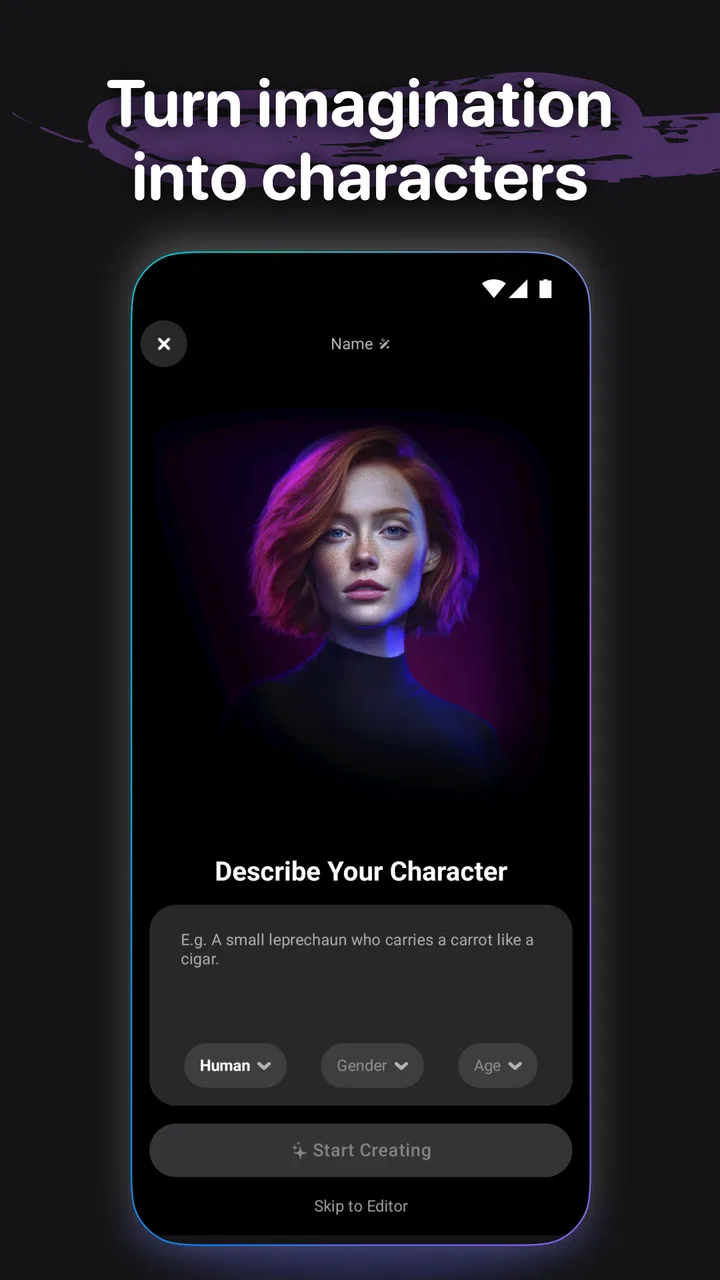
The central appeal is the chance to create personalities that can carry a conversation or become part of a video concept. Instead of starting with a blank editing timeline, I found it more natural to start with a character idea: a particular attitude, voice, role, or fictional situation. That gives the creative process a direction before I worry about presentation. For people who enjoy improvisation, role-play, comedy sketches, or visual storytelling, this is much more inviting than a traditional editor filled with technical controls.
You May Also Like

 Blood Strike: 2.5 Anniversary
Blood Strike’s Loadouts Turn Every Drop Into a Tactical Gamble
A close look at Blood Strike’s custom loadouts: how fast access to signature weapons reshapes its battle royale rhythm, rewards preparation, and narrows the gap between fights.

 Pandora - Music & Podcasts
Pandora’s Music Is Easy to Start, but Harder to Recover
Pandora’s strength is its low-effort path from a seed to a station. Its weak spot is how much confidence it asks you to place in connection, setup, and quiet recovery.

 8 Ball Pool
 Is Built on Rivalries, Rematches, and Routine
A close look at the rivalries, rematches, shared routines, and unanswered safety questions that turn a quick pool match into a persistent mobile community.

 Samsung Music
’s Quiet Strength Is Playing What You Already Own
Its reach comes less from spectacle than from dependable access to a personal library. That simplicity is both the app’s strongest retention engine and its ceiling.

 AccuWeather: Weather Radar
AccuWeather Review: A Quick, Clear Forecast for Everyday Decisions
For everyday plans, the best forecast is the one you can understand quickly. AccuWeather makes rain timing, radar, and local conditions easy to act on, with a few trade-offs.

 Hill Climb Racing
Why Hill Climb Racing Still Turns Crashes Into One More Run
A tiny car, a bumpy hill and one more upgrade: Hill Climb Racing keeps resurfacing because its simple chaos makes every near-miss feel personal.
More From Our News Desk
View All News


The social category is important because the output is not only for private experimentation. The app is designed around characters and videos that can be experienced in a shared environment. I treated every creation as something that might eventually be seen by another person, even when I was still refining it. That mindset helped me avoid adding real-world details to a character or conversation that did not need them.
The current version is 7.6.0, and the app has been available since October 7, 2015. Its long presence and scale give it a more established feel than a brand-new experiment: it has passed one million installs, with an average rating of 4.9 from around seventeen thousand ratings and roughly three thousand seven hundred written reviews. Those figures suggest strong user satisfaction, but I would not treat them as proof that every interaction will suit every audience. Creative social apps can be loved by their main community while still feeling unsuitable to someone who wants strict privacy or a quiet, utility-first tool.
Starting with a character instead of a profile
One practical strength is that a character can give a conversation a purpose. I could think in terms of “what would this personality say or do?” rather than trying to present a polished version of myself immediately. That makes the first session less intimidating, especially for someone who is curious about AI but does not know what prompt or project to begin with.
A useful workflow is to keep the first character deliberately narrow. Give it one recognizable trait, one situation, and one intended audience. A sarcastic cooking companion, a dramatic narrator for a short clip, or a fictional travel guide is easier to evaluate than a character expected to be funny, wise, romantic, informative, and realistic at the same time. Narrower concepts also make it easier to notice when the generated result drifts away from the tone you wanted.
I would not use a character as a substitute for a trusted human adviser. AI personalities can be entertaining and productive for brainstorming, but the social presentation can make an exchange feel more personal than it really is. My rule is simple: use the character for creative momentum, not for decisions involving health, money, safety, or sensitive relationships.
Turning experiments into videos
The video side gives the app a clear advantage over ordinary AI chat services. A conversation or character concept can become something visual and shareable, which is useful when the goal is a skit, a reaction, a fictional announcement, or a quick piece of social content. I found that the best results came from planning the scene before generating it: decide who is speaking, what the punchline or point is, and where the clip should end.
This planning step is more valuable than repeatedly asking for random variations. If I changed everything at once, it became difficult to tell whether the character, wording, or visual idea was responsible for a weak result. A better approach is to alter one element at a time, save the version that has the right personality, and only then work on the video presentation. That creates a small creative trail and reduces the temptation to publish the first amusing result.
There is also a trade-off here. The convenience of AI-assisted creation can make a video feel finished before it has been checked carefully. I would watch a draft without distractions and ask whether the character says anything misleading, whether the tone could be misunderstood, and whether another person appears identifiable without permission. Speed is one of Cantina’s attractions, but speed should not replace editing.
Trust begins with visible choices
When I assess a social app, I look for the choices that are visible during ordinary use rather than assuming that a polished interface tells me everything. With Cantina, the important moments are the ones involving account setup, character creation, conversation, video generation, and sharing. Those are the points where I would slow down and read the wording on screen before continuing.
I also separate three things that are easy to confuse: content I create, conversations I have, and information connected to my account. They may feel like one creative session, but they represent different kinds of exposure. Before sharing a character or video, I would check exactly what action I am taking and whether it is meant for a broad social audience or a smaller circle. If the app presents a choice, I prefer making it deliberately rather than relying on a default.
I cannot recommend treating any social AI service as a private diary. Even when a conversation feels casual, I would leave out passwords, financial details, precise location information, private medical history, and identifying details about other people. This is not a criticism unique to Cantina; it is the sensible boundary for any connected service that combines user-created content with social interaction.
Account control and everyday boundaries
A good first session should include a short account check, not just a creative test. I would review the profile information I chose to display, look at how sharing is presented, and decide whether the account should use a public-facing identity or a less revealing one. A character can be imaginative without being linked to my full real-world identity, and that separation is useful when I am experimenting.
For younger users, the Teen content rating makes adult supervision and a conversation about online boundaries worthwhile. The rating does not turn the app into a child-focused service, and the social aspect means that a teenager should understand the difference between a fictional AI character and a real person interacting through a platform. I would encourage families to discuss what may be posted, what should stay private, and what to do when a conversation becomes uncomfortable.
One of the most practical habits is to create a “safe draft” first. I can test the character using invented names, fictional locations, and harmless scenarios. Only after the behavior feels appropriate would I consider making something more personal. This approach protects the creative process as well as the user: it is much easier to revise a fictional concept than to undo an impulsive public post containing real details.
Where data-sensitive moments appear
The most sensitive point is not necessarily the final video. It can be the prompt or conversation used to produce it. A user may type a private anecdote because it seems like the fastest way to make a character sound authentic, then forget that the anecdote itself contains information about a friend, colleague, or family member. I would rewrite those details into a fictional version before using them.
Images, voices, and recognizable personal stories deserve the same caution. If a creative idea depends on another person’s face, name, voice, or distinctive experience, I would ask for permission before turning it into a social video. If permission is not clear, I would change the details enough to make the concept fictional. The result is often better creatively because it becomes a character rather than a thin copy of someone real.
Another sensitive moment comes when a generated character sounds confident. A convincing tone can hide uncertainty, especially in a video where viewers may not see the original context. I would add a clear fictional framing when the subject could be mistaken for a real statement, endorsement, or event. That small editorial decision protects viewers from reading a creative experiment as factual content.
I also recommend keeping a clean separation between private brainstorming and publishable material. I would not assume that deleting a draft, changing a character name, or removing a video automatically erases every earlier impression or copy. The safest practice is to avoid placing sensitive information into the project in the first place. That is a stronger form of control than trying to clean up after sharing.
How it compares with familiar alternatives
Compared with a standard social feed, Cantina feels more participatory. A normal feed asks me to react to other people’s finished posts; here, the creative object begins with a character or generated idea. That makes it more appealing when I want to make something, but less appealing when I only want quick news, direct contact with friends, or a predictable stream of human-authored updates.
Compared with a general AI chatbot, the video and social angle gives Cantina a more playful destination. A chatbot may be better for long-form research, careful drafting, or a private-feeling work session, while Cantina is more naturally suited to personalities, scenes, and shareable experiments. I would choose the latter when visual presentation and character interaction are part of the goal, and the former when precision and sustained text work matter more.
Compared with a dedicated video editor, Cantina lowers the barrier to inventing a concept and giving it a voice. A professional editor still offers more deliberate control over timing, sound, layers, and finishing. Cantina is therefore not the tool I would pick for a polished campaign or a carefully controlled production. It is better for rapid prototypes, playful clips, and discovering an idea before investing more time elsewhere.
That comparison also clarifies who should skip it. If I wanted a strictly private notes app, a conventional group messenger, or a powerful manual editing suite, I would choose something built specifically for that job. Cantina makes the most sense for someone comfortable with experimentation and willing to review content before sharing it.
A realistic use case: making a short clip after work
Imagine I have a few minutes after work and want to make a humorous video about a fictional office character. I would begin with an invented name and a harmless premise, such as an overly dramatic assistant reacting to a missing snack. I would keep real coworkers, company names, internal messages, and identifiable workplace details out of the prompt. The goal is to capture the comedy of the situation without turning a private incident into public content.
Next, I would test the character in a short exchange and look for consistency. Does the personality remain recognizable? Does the humor depend on insulting a real group or person? Does the character make a claim that could be mistaken for a genuine workplace statement? I would revise those points before creating the video, rather than expecting the final format to fix them.
After generating a draft, I would watch it as if I were a stranger seeing it without context. If the clip works only because I know the private story behind it, I would rewrite the setup. If it is clear, fictional, and entertaining on its own, I would then consider sharing it. This workflow takes slightly longer than instant posting, but it gives me better control over privacy, tone, and audience interpretation.
Small habits that improve the experience
My first tip is to maintain a character brief outside the app. A few lines describing the personality, boundaries, speaking style, and purpose make it easier to recreate or refine the idea. This is especially useful when a character begins to drift. Instead of adding increasingly complicated instructions, I can return to the original brief and remove traits that are fighting each other.
My second tip is to separate “funny” from “shareable.” A private experiment may be amusing because it is strange or unexpectedly personal, while a public video needs context and a clear reason for viewers to care. I would save the odd experiments for learning and reserve sharing for pieces that do not depend on confidential background.
My third tip is to use fictional test data throughout the creative process. Invented names, generic settings, and made-up events are enough to evaluate whether a character works. This is a particularly useful habit for teenagers, creators working with real clients, and anyone producing content inspired by conversations they have had offline.
My fourth tip is to pause before granting an audience to a finished idea. The most important control is often not a sophisticated editing option but the decision to delay sharing. A short cooling-off period makes it easier to notice accidental personal references, unfair portrayals, or wording that sounded harmless during creation but looks different when viewed on its own.
What I liked, and where I felt friction
I liked the way Cantina turns character design into an accessible creative activity. I did not need to begin with advanced video knowledge or a fully written script. The character itself supplied a starting point, and that made brainstorming feel less like work. The combination is also more memorable than a generic AI conversation because the result has a social and visual direction.
The friction comes from the same source. When a tool makes creation easy, it can encourage shallow ideas and impulsive sharing. I had to supply the judgment that the app’s convenience does not provide: deciding what belongs in a fictional scene, what needs context, and what should never be uploaded. Users who prefer careful manual control may find the process less predictable than a traditional editor.
I would also avoid judging the app only by its high average rating or its large install base. Those figures show that many people enjoy it, but they do not answer the personal questions that matter most: whether the social environment fits my habits, whether I am comfortable with AI-generated characters, and whether I can maintain sensible boundaries around my content. Those are decisions each user has to make through actual use.
My cautious recommendation
I recommend Cantina to curious creators, role-play fans, and people who want a low-pressure way to turn AI character ideas into videos. It is especially appealing when the goal is to prototype a personality, explore a fictional scene, or make a playful clip without assembling a full production workflow. The free entry point makes experimentation easy, and the Teen rating gives families a clear reason to discuss responsible use before younger users become active.
I would skip it if my priority were private journaling, serious research, direct communication with close friends, or precise professional video control. I would also skip it if I knew I would upload real conversations, identifiable people, or sensitive personal stories without taking time to edit them into safe fictional material.
My final view is that Cantina works best when I treat it as a creative studio with a social door, not as a confidential space. The strongest experience comes from inventing first, refining second, and sharing only after checking the audience, the wording, and the personal details involved. The best protection is deliberate user choice before creation becomes public. Used with that discipline, it is a distinctive and enjoyable social app; used carelessly, its speed can make oversharing feel easier than it should.
FAQs for Cantina
01What is Cantina and what does it offer?
Cantina is a versatile app designed to enhance your dining and drinking experiences. It offers features such as digital menus, real-time table reservations, and personalized recommendations based on your preferences. Whether you're dining out or ordering in, Cantina aims to make the process seamless and enjoyable.
02Is Cantina available for both Android and iOS devices?
Yes, Cantina is available for download on both Android and iOS platforms. You can easily find it on the Google Play Store for Android devices and the Apple App Store for iOS devices. This ensures a wide range of users can access its features regardless of their device.
03Does Cantina provide real-time updates for reservations?
Absolutely. Cantina offers real-time updates for your reservations, allowing you to make or adjust bookings instantly. You’ll receive notifications about your table status, ensuring you’re always in the loop about any changes, which helps in planning your visit without any hassle.
04Are there any costs associated with using Cantina?
Cantina is free to download and use, but it may offer premium features or in-app purchases for enhanced functionalities. While the basic features are available at no cost, exploring these additional options can provide a more tailored and enriched experience.
05How does Cantina handle user data and privacy?
Cantina takes user privacy seriously and adheres to strict data protection regulations. It collects only necessary information to enhance user experience and implements secure practices to safeguard your data. Users can review the privacy policy within the app to understand how their information is managed.
Pros
- User-friendly interface with intuitive navigation.
- Wide variety of drink recipes available.
- Customizable shopping list feature.
- Syncs across multiple devices seamlessly.
- Includes a community feature for sharing tips.
Cons
- Limited offline functionality.
- Ads can be intrusive at times.
- No option for dark mode theme.
- Requires account creation to access all features.
- Some recipes require premium subscription.

Cantina
Gallery